Prefect Orchestration
Foundation PLR uses Prefect for workflow orchestration, enabling reliable, observable pipelines.
Overview
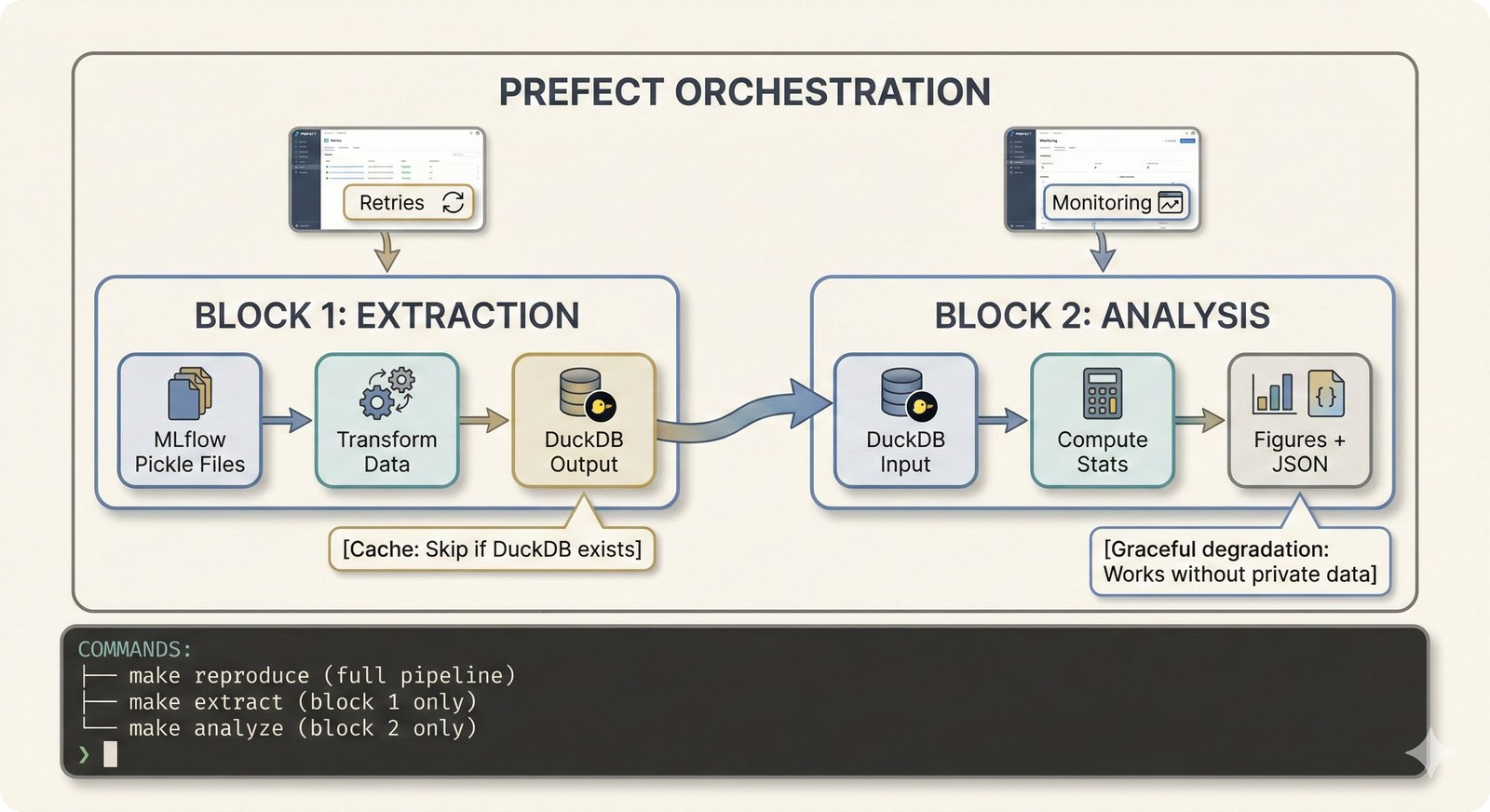
The pipeline is organized into two decoupled blocks:
flowchart LR
    subgraph "Block 1: Extraction"
        A[MLflow Pickles] --> B[extraction_flow.py]
        B --> C[(DuckDB)]
        B --> D[Private lookup]
    end

    subgraph "Block 2: Analysis"
        C --> E[analysis_flow.py]
        E --> F[Figures]
        E --> G[LaTeX tables]
end| Block | Purpose | Can Run Independently |
|---|---|---|
| Extraction | MLflow → DuckDB | Yes |
| Analysis | DuckDB → Figures | Yes (from checkpoint) |
Prefect UI: Flow Execution
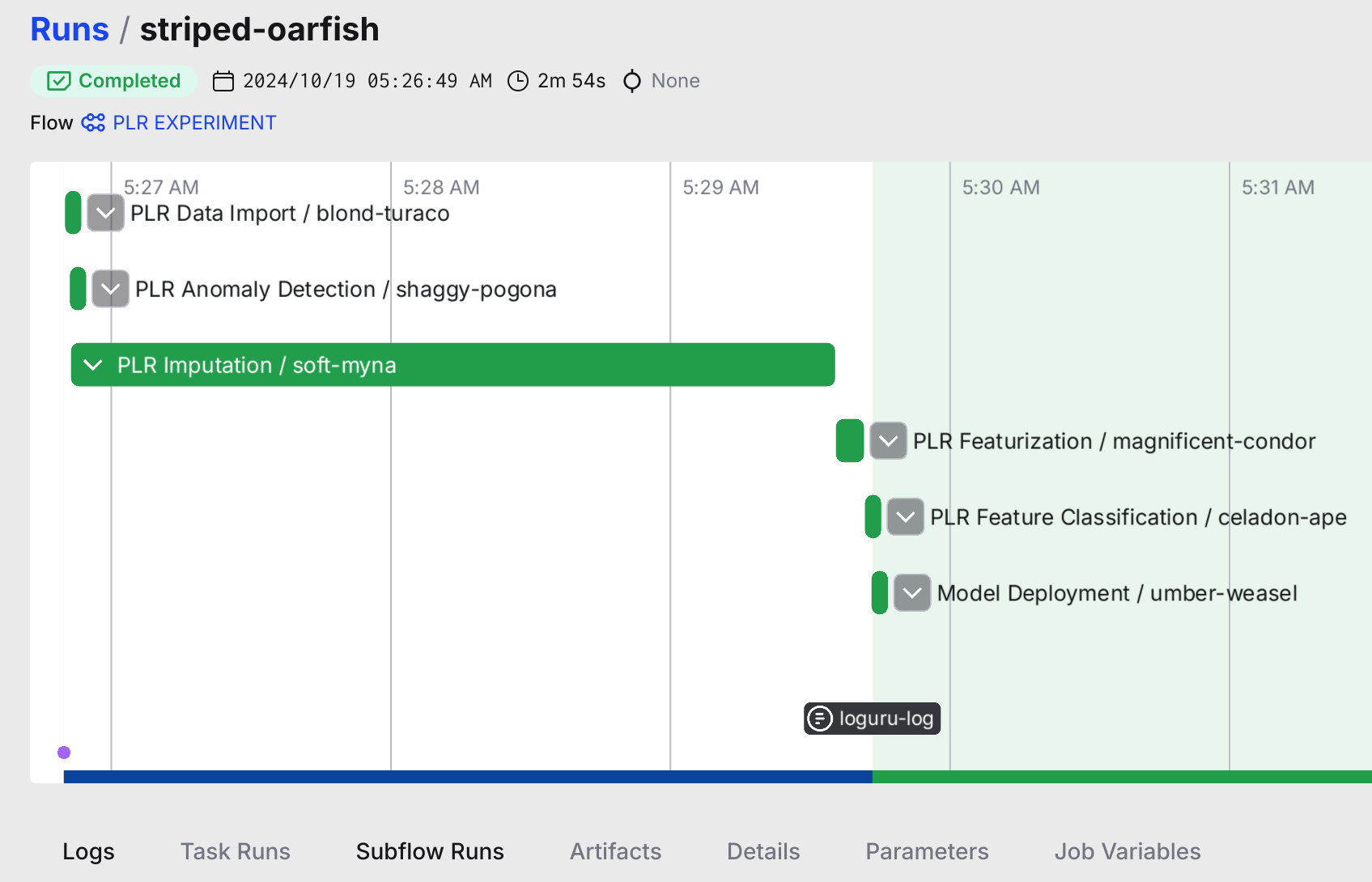
The Prefect dashboard showing a completed pipeline run with all 6 subflows.
Experiment Pipeline: 6 Subflows
The experiment pipeline (distinct from the post-experiment extraction/analysis blocks above) consists of 6 Prefect subflows. Each subflow uses "MLflow as contract" — reading inputs from and writing outputs to MLflow — which enables team members with different expertise to work independently on their component.
| # | Subflow | Entry Point | Professional Persona |
|---|---|---|---|
| 1 | Data Import | src/data_io/flow_data.py |
Data Engineer |
| 2 | Outlier Detection | src/anomaly_detection/flow_anomaly_detection.py |
Signal Processing Expert |
| 3 | Imputation | src/imputation/flow_imputation.py |
Signal Processing Expert |
| 4 | Featurization | src/featurization/flow_featurization.py |
Domain Expert |
| 5 | Classification | src/classification/flow_classification.py |
Biostatistician |
| 6 | Deployment | src/deploy/flow_deployment.py |
MLOps Engineer |
Why This Decoupling Matters
Each subflow reads from and writes to MLflow, creating a clean contract boundary:
- A domain expert can modify featurization (time bins, latency features) without touching classification code
- A signal processing expert can swap outlier detection algorithms (LOF → MOMENT) without understanding the classifier
- A biostatistician can adjust evaluation metrics without knowing how imputation works
- An MLOps engineer can deploy models without understanding the signal processing pipeline
This is separate from the 2-block extraction/analysis architecture documented above, which handles post-experiment processing.
Detailed Architecture Diagram
See fig-repo-10: Prefect Experiment Pipeline for a detailed visual of the 6-subflow architecture with data flow.
Running Flows
Quick Start
# Full pipeline
make reproduce

# From checkpoint (skip extraction)
make reproduce-from-checkpoint

# Individual blocks
make extract
make analyze
Direct Python Execution
# Extraction flow
python -m src.orchestration.flows.extraction_flow

# Analysis flow
python -m src.orchestration.flows.analysis_flow
Via Prefect Server
# Start Prefect server (optional)
prefect server start

# Deploy flows
python src/create_prefect_deployment.py

# Run deployments
prefect deployment run extraction-flow/default
prefect deployment run analysis-flow/default
Flow Architecture
Extraction Flow (extraction_flow.py)
Extracts MLflow experiment results with privacy separation:
@flow(name="extraction-flow")
def run_extraction_flow(
    mlflow_uri: str = "file:///home/petteri/mlruns",
    output_db: str = "data/public/foundation_plr_results.db",
    private_dir: str = "data/private/"
) -> Dict[str, Any]:
    """
    Outputs:
    - PUBLIC: foundation_plr_results.db (re-anonymized Hxxx/Gxxx codes)
    - PRIVATE: subject_lookup.yaml (mapping to original PLRxxxx codes)
    - PRIVATE: demo_subjects_traces.pkl (raw PLR traces)
    """
Tasks:
1. load_mlflow_experiments() - Find classification runs
2. extract_bootstrap_metrics() - Parse 542 pickle files
3. compute_stratos_metrics() - Calculate all STRATOS metrics
4. create_anonymized_db() - Write DuckDB with re-anonymization
5. save_private_lookup() - Store subject code mapping
Analysis Flow (analysis_flow.py)
Generates all figures and artifacts from DuckDB:
@flow(name="analysis-flow")
def run_analysis_flow(
    db_path: str = "data/public/foundation_plr_results.db"
) -> Dict[str, Path]:
    """
    Outputs:
    - figures/generated/*.png
    - figures/generated/data/*.json
    - outputs/latex/*.tex
    """
Tasks:
1. validate_database() - Check DuckDB schema
2. generate_python_figures() - Run src/viz/ scripts
3. generate_r_figures() - Run src/r/figures/ scripts
4. export_latex_tables() - Create LaTeX artifacts
Task Decorators
Prefect tasks enable: - Retries: Automatic retry on failure - Caching: Skip recomputation of unchanged results - Logging: Structured logs with task context
from prefect import task, flow

@task(retries=3, cache_key_fn=task_input_hash)
def extract_metrics(pickle_path: Path) -> dict:
    """Extract metrics from a single pickle file."""
    with open(pickle_path, "rb") as f:
        return pickle.load(f)

@flow(name="my-flow")
def my_flow():
    results = extract_metrics.map(pickle_paths)  # Parallel execution
Graceful Degradation
The flows work without Prefect installed:
# In extraction_flow.py
USE_PREFECT = os.environ.get("PREFECT_DISABLED", "").lower() not in ("1", "true", "yes")

if USE_PREFECT:
    from prefect import flow, task
else:
    # No-op decorators
    def task(fn=None, **kwargs):
        return fn if fn else lambda f: f
Disable Prefect for testing:
Configuration
Prefect settings are in configs/defaults.yaml:
PREFECT:
  PROCESS_FLOWS:
    OUTLIER_DETECTION: true
    IMPUTATION: true
    FEATURIZATION: true
    CLASSIFICATION: true
    SUMMARIZATION: false
    DEPLOYMENT: false
Monitoring
Prefect UI
The UI shows: - Flow run history - Task dependencies - Logs and artifacts - Deployment schedules
CLI Monitoring
# List flow runs
prefect flow-run ls

# Get run details
prefect flow-run inspect <run-id>

# View logs
prefect flow-run logs <run-id>
Error Handling
Common Issues
| Error | Cause | Solution |
|---|---|---|
ModuleNotFoundError: prefect |
Prefect not installed | uv pip install prefect |
Database locked |
Concurrent DuckDB access | Wait or use --force |
MLflow tracking URI invalid |
Wrong path | Check mlflow_uri parameter |
Recovery
# Clear Prefect cache
prefect cache clear

# Reset flow state
prefect flow-run cancel <run-id>

# Force re-extraction
make extract FORCE=1
See Also
- Pipeline Overview - Full pipeline architecture
- ARCHITECTURE.md - System design
- Prefect Docs - Official documentation