Troubleshooting
Common issues and their solutions, organized by category.
Docker Issues
PostgreSQL Won't Start
Symptom: docker compose up fails with "port 5432 already in use" or the PostgreSQL container restarts in a loop.
Cause: Another PostgreSQL instance (system-level or another project) is already bound to port 5432, or a previous container was not properly stopped.
Fix:
# Check what is using port 5432
sudo lsof -i :5432

# Stop any existing PostgreSQL service
sudo systemctl stop postgresql

# Or kill the specific container
docker ps -a | grep postgres
docker stop <container_id> && docker rm <container_id>

# Restart the project's PostgreSQL
docker compose up -d db
pgvector Extension Not Available
Symptom: Database migrations fail with ERROR: could not open extension control file "/usr/share/postgresql/.../vector.control": No such file or directory.
Cause: The PostgreSQL container image does not include the pgvector extension. The project requires an image with pgvector pre-installed.
Fix: Ensure your docker-compose.yml uses the pgvector image:
If you are using testcontainers, the pgvector image must be specified there as well.
Docker DNS Failures on Linux
Symptom: Container builds fail with DNS resolution errors like Could not resolve host: pypi.org or Temporary failure in name resolution.
Cause: On Ubuntu/systemd systems, systemd-resolved binds to 127.0.0.53 which is not accessible from within Docker containers. This is a local-only issue; CI environments are unaffected.
Fix:
# Option 1: Configure Docker to use Google DNS
sudo mkdir -p /etc/docker
echo '{"dns": ["8.8.8.8", "8.8.4.4"]}' | sudo tee /etc/docker/daemon.json
sudo systemctl restart docker

# Option 2: Use host network during build
docker compose build --network=host
Database Issues
Migration Failures
Symptom: alembic upgrade head fails with relation already exists or column does not exist.
Cause: The database schema is out of sync with the migration chain, often from a previous interrupted migration or manual schema changes.
Fix:
# Check current migration state
alembic current

# If the database is in a bad state, stamp it to a known good revision
alembic stamp head

# Or reset completely (destroys all data)
alembic downgrade base
alembic upgrade head
Connection Refused
Symptom: sqlalchemy.exc.OperationalError: could not connect to server: Connection refused when starting the API.
Cause: PostgreSQL is not running, or the DATABASE_URL environment variable points to the wrong host/port.
Fix:
# Check if PostgreSQL is running
docker compose ps

# Start it if not
docker compose up -d db

# Verify connection
docker compose exec db psql -U postgres -c "SELECT 1"

# Check your DATABASE_URL
echo $DATABASE_URL
# Expected: postgresql+asyncpg://…@localhost:5432/music_attribution
CREATE EXTENSION vector Fails
Symptom: CREATE EXTENSION IF NOT EXISTS vector fails in migration or test setup.
Cause: The vector extension is not installed in the PostgreSQL instance. This typically happens when using plain postgres image instead of pgvector/pgvector.
Fix:
For Docker Compose, use the pgvector image (see "pgvector Extension Not Available" above).
For testcontainers, the extension must be created explicitly after container startup:
# In your test setup
engine = create_engine(container_url)
with engine.connect() as conn:
    conn.execute(text("CREATE EXTENSION IF NOT EXISTS vector"))
    conn.commit()
Testing Issues
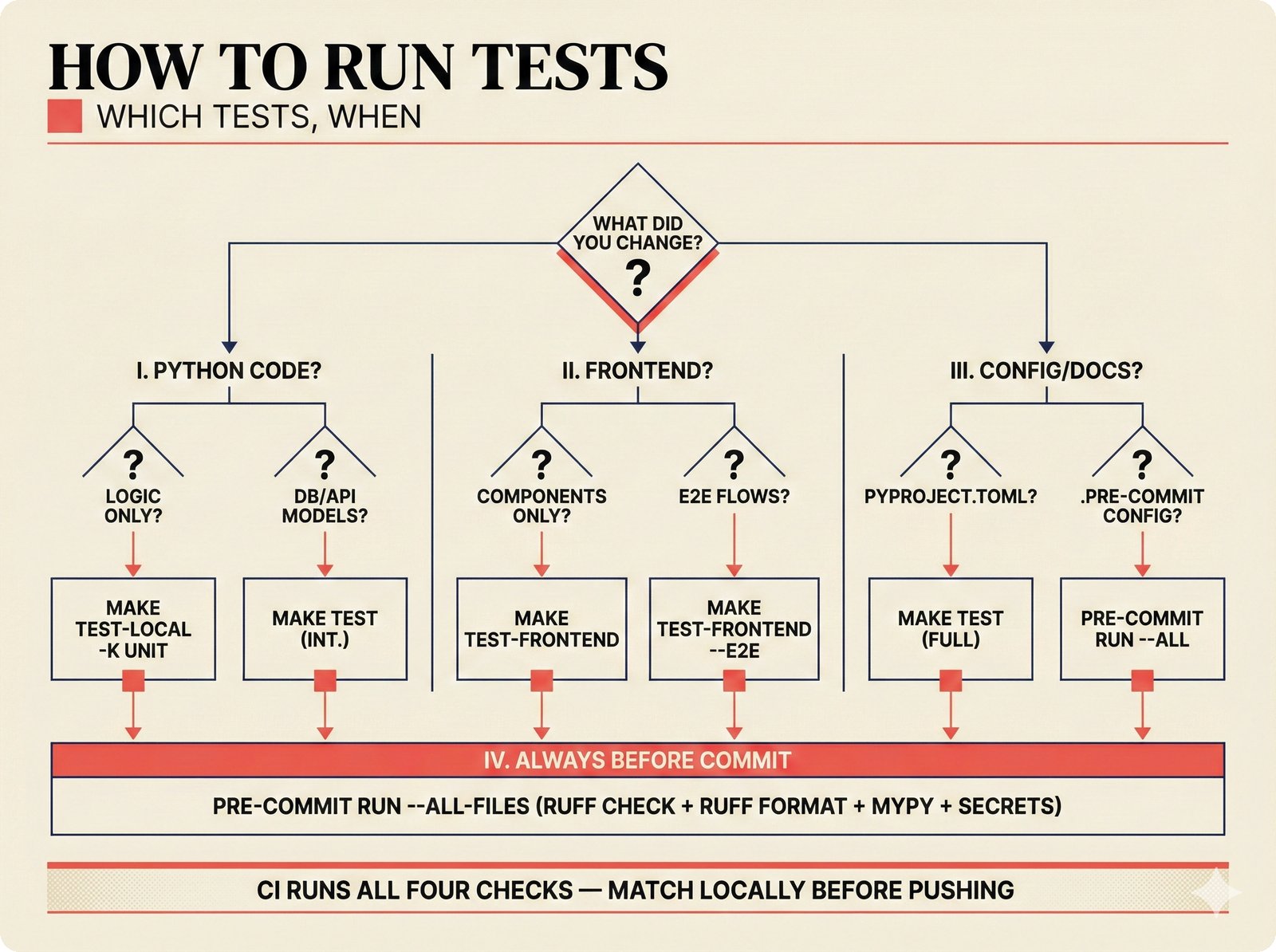
Test selection decision tree for the Music Attribution Scaffold. Contributors follow branching paths based on what they changed -- Python logic, database models, frontend components, or configuration -- to run the minimal necessary test suite, with pre-commit hooks as a universal quality gate before every commit (Teikari, 2026).
VIRTUAL_ENV Mismatch
Symptom: Running pytest directly picks up the wrong Python or packages from a different virtual environment, causing import errors.
Cause: The VIRTUAL_ENV environment variable is set to a different project's virtual environment (often from a previous shell session or terminal profile).
Fix: Always use the explicit path to the project's virtual environment:
# Instead of bare pytest
.venv/bin/python -m pytest tests/ -x -q

# Or use the Makefile target
make test-local
Testcontainers Failures
Symptom: Integration tests fail with docker.errors.DockerException or testcontainer timeouts.
Cause: Docker is not running, the Docker socket is not accessible, or the pgvector image has not been pulled.
Fix:
# Ensure Docker is running
docker info

# Pull the required image
docker pull pgvector/pgvector:pg16

# Check Docker socket permissions
ls -la /var/run/docker.sock
# If permission denied, add your user to the docker group:
sudo usermod -aG docker $USER
# Then log out and back in
Docker Test Container File Access
Symptom: Tests pass locally but fail in the Docker test container with FileNotFoundError for files like Makefile, scripts/, or frontend/.
Cause: The docker/Dockerfile.test only copies src/, tests/, and alembic/ into the container. Tests that read other project files will fail.
Fix: Guard tests that access project layout files:
import os

RUNNING_IN_DOCKER = os.path.exists("/.dockerenv")

@pytest.mark.skipif(RUNNING_IN_DOCKER, reason="File not available in Docker test container")
def test_that_reads_makefile():
    ...
Frontend Issues
npm install Fails
Symptom: npm install in the frontend/ directory fails with peer dependency conflicts or resolution errors.
Cause: Node.js version mismatch or stale lockfile.
Fix:
# Check Node version (should be 18+)
node --version

# Clear cache and reinstall
cd frontend
rm -rf node_modules .next
npm install

# If peer dependency conflicts persist
npm install --legacy-peer-deps
NEXT_PUBLIC_API_URL Not Set
Symptom: Frontend loads but shows no data, or API calls fail with CORS errors pointing to undefined.
Cause: The NEXT_PUBLIC_API_URL environment variable is not set. Next.js requires NEXT_PUBLIC_ prefixed variables to be set at build time (or in .env.local).
Fix:
# Option 1: Set in .env.local
echo "NEXT_PUBLIC_API_URL=http://localhost:8000" > frontend/.env.local

# Option 2: Set inline
NEXT_PUBLIC_API_URL=http://localhost:8000 npm run dev
CORS Errors
Symptom: Browser console shows Access to fetch at 'http://localhost:8000/...' from origin 'http://localhost:3000' has been blocked by CORS policy.
Cause: The FastAPI backend's CORS middleware does not include the frontend's origin.
Fix: Set the CORS_ORIGINS environment variable when starting the backend:
Or add it to your .env file. The default configuration in src/music_attribution/api/app.py reads from settings.cors_origins.
Agent Issues
ANTHROPIC_API_KEY Missing
Symptom: The CopilotKit sidebar shows "I encountered an error processing your request" or the agent endpoint returns a 500 error.
Cause: The ANTHROPIC_API_KEY environment variable is not set. The PydanticAI agent requires it to call the Anthropic API.
Fix:
# Set the API key
export ANTHROPIC_API_KEY="your-api-key"  # pragma: allowlist secret

# Or add to .env file
echo 'ANTHROPIC_API_KEY=your-api-key' >> .env  # pragma: allowlist secret

# Restart the backend
make agent
The agent is a lazy singleton -- it is only created on the first request. If the key is missing, the first agent request will fail but the rest of the API will work normally.
Model Not Found
Symptom: Agent requests fail with anthropic.NotFoundError: Error code: 404 - model not found.
Cause: The ATTRIBUTION_AGENT_MODEL environment variable is set to an invalid model name.
Fix:
# Use the default model (Haiku 4.5)
unset ATTRIBUTION_AGENT_MODEL

# Or set to a valid model
export ATTRIBUTION_AGENT_MODEL="anthropic:claude-haiku-4-5"
Valid model strings follow the PydanticAI format: anthropic:claude-haiku-4-5, anthropic:claude-sonnet-4-5, etc.
CI Issues
Ruff Version Mismatch
Symptom: Pre-commit hooks pass locally but CI fails with formatting differences, or vice versa. Ruff reports different lint results between local and CI.
Cause: The ruff version in .pre-commit-config.yaml (via rev:) differs from the version in uv.lock. Pre-commit downloads its own copy of ruff, which may produce different formatting than the project's pinned version.
Fix: The project uses repo: local hooks that run uv run ruff so that pre-commit and CI use the same ruff version from uv.lock. If you see version mismatches:
# Ensure pre-commit uses local ruff
# In .pre-commit-config.yaml, hooks should use:
#   repo: local
#   entry: uv run ruff check ...

# Update ruff to latest
uv add --dev ruff@latest

# Regenerate lockfile
uv sync

# Verify consistency
uv run ruff --version
pre-commit run ruff-check --all-files
Pre-commit Hook Failures
Symptom: pre-commit run --all-files fails on one or more hooks.
Cause: Various -- formatting issues, lint errors, type errors, YAML syntax errors, or secrets detected.
Fix: The CI workflow runs four checks that must all pass:
# Run all four checks locally
uv run ruff check src/ tests/     # Lint
uv run ruff format --check src/ tests/  # Format
uv run mypy src/                  # Type check
.venv/bin/python -m pytest tests/ -x -q  # Tests

# Fix formatting automatically
uv run ruff format src/ tests/

# Fix auto-fixable lint issues
uv run ruff check --fix src/ tests/

# Then re-run pre-commit
pre-commit run --all-files
If the .pre-commit-config.yaml file itself has YAML syntax errors, fix that first before anything else.
Docker Test Container Failures in CI
Symptom: CI tests fail with errors about missing files or wrong paths, but tests pass locally.
Cause: The Docker test container (docker/Dockerfile.test) only copies a subset of the project files. Tests that rely on files outside src/, tests/, and alembic/ will fail.
Fix: Either:
- Move the required file into one of the copied directories, or
- Skip the test in Docker with
@pytest.mark.skipif(RUNNING_IN_DOCKER, ...)(see "Docker Test Container File Access" above)
Getting Help
If your issue is not listed here:
- Search existing GitHub issues
- Check the Architecture Overview for understanding the system design
- Open a new issue with:
- Steps to reproduce
- Expected vs actual behavior
- Output of
uv run python --version,docker --version,node --version - Your OS and architecture